Should You Buy Spare LED Modules? How Many to Prepare?
Published 2026-09-17 · Updated 2026-09-22 · By Arclumin Team
Spare LED modules can reduce downtime while faulty parts are repaired. Learn how to plan quantities, check compatibility, and store spares for your project.
Why Plan Spare Modules at the Time of Purchase
When buying an LED display, it is natural to focus on screen size, image quality, and price. Spare LED modules can look like an extra cost for equipment that has not even started working. However, a small stock of compatible parts can help a technician restore a damaged section while the faulty part goes through the repair process.
For a screen that needs to stay in service, plan spare modules with the original order. The right quantity depends on the number of installed modules, how the screen is used, and how quickly replacements can arrive. A percentage can help you compare budgets, but it is not a universal rule or a prediction of failure.
Concept illustration of spare module storage.
Understand the Difference Between a Module and a Cabinet
An LED module is one of the smaller display units that make up a screen. A cabinet typically holds several modules together with components such as power supplies and a receiving card. A spare module replaces a display unit, while a spare cabinet provides a larger replacement assembly.
For a time-sensitive event, a complete spare cabinet may suit the service plan better than replacing individual modules during a short break. It also takes more storage space and transport capacity. Ask the technical team which replacement method is practical for the installation before deciding what to buy.
A Warranty Does Not Remove the Waiting Time
Warranty coverage and local spare stock serve different purposes. The warranty sets out the agreed repair or replacement terms. Spare stock gives the service team access to parts without first waiting for a shipment to arrive.
If a shop display needs a module repaired, the process may involve fault diagnosis, return shipping, repair, and delivery back to the site. A compatible spare can reduce the time that the affected display area stays out of service. Remember that a dark section can also result from a power, cable, or control issue, so a technician should identify the cause before replacing a module.
Count the Installed Modules Before Choosing a Percentage
Start with the actual number of installed modules, rather than only the screen area or cabinet count. If the project uses different module models, make a separate list for each type. A spare for one type should not be assumed to fit another.
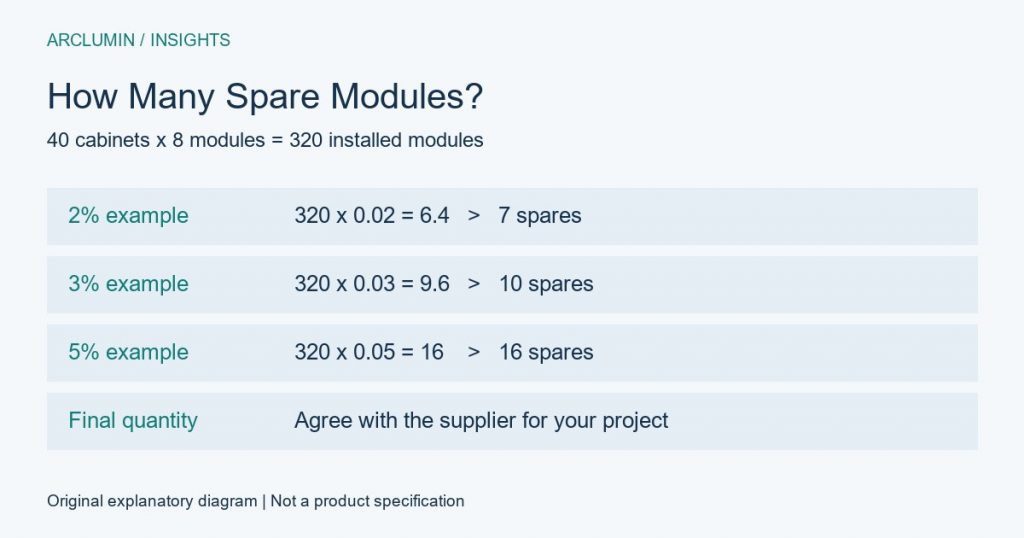
The basic calculation is simple: installed module quantity multiplied by the agreed spare percentage, rounded up to a whole module. For example, a hypothetical screen with 40 cabinets and eight modules in each cabinet has 320 installed modules. The examples below show the arithmetic for three possible budget scenarios.
At 2%, the calculation is 320 multiplied by 0.02, giving 6.4, so the order would contain seven spare modules. At 3%, it gives 9.6, rounded up to ten. At 5%, it gives sixteen.
These percentages are examples, not a recommended range for every project. Keeping 3% in stock does not mean that 3% will fail, or that ten modules will cover the entire life of this screen. Confirm the final quantity against the service plan and the supplier’s experience with the specific equipment.
Adjust the Quantity to the Way the Screen Will Be Used
First, consider the effect of downtime. A conference or performance has a fixed start time, so waiting for delivery may not be acceptable. For rental and live event projects, discuss both local module stock and complete cabinet replacements with the service team.
Next, check how the equipment travels and how long replenishment takes. Frequent packing and installation create handling exposure, while an overseas site may face shipping and customs delays. A site close to a repair center and a site several weeks away from replacement stock need different plans.
Also consider whether several projects share the same spares. A central warehouse may be useful, but those parts must still reach the screen when needed. Agree on where stock is held, who can release it, and when used stock will be repaired or replenished.
Check Compatibility and Batch Records
Matching the physical size and pixel pitch is not enough to prove that a module is compatible. The model, mounting arrangement, electrical requirements, connectors, and control configuration also matter. Ask the supplier to identify the correct replacement for the exact order.
For example, when specifying TL Traveling Light, record the selected cabinet and module configuration rather than using the series name alone as the spare-part description. Keep the order number, module identification, and available batch records together. This makes later requests for replacements easier to check.
Request matching spare modules with the initial delivery where practical. Even then, a stored spare and an installed screen can have different operating histories, so the technician should check brightness and color after replacement. Follow the product-specific procedure for configuration and calibration rather than assuming every module automatically matches.
Confirm What the Spare Parts Package Includes
Ask the supplier to state the installed module count, the included spare quantity, and the price of any additional units separately. Confirm whether the spares match the order, what identification they carry, and what setup is required after replacement. Also ask for the expected repair and replenishment process.
Modules are only one part of the maintenance plan. Depending on the screen design, the team may also need compatible power supplies, receiving cards, cables, and approved service tools. Compare quotations using the same list of equipment so that a lower headline price does not hide a smaller spare package.
Store and Track the Spares Properly
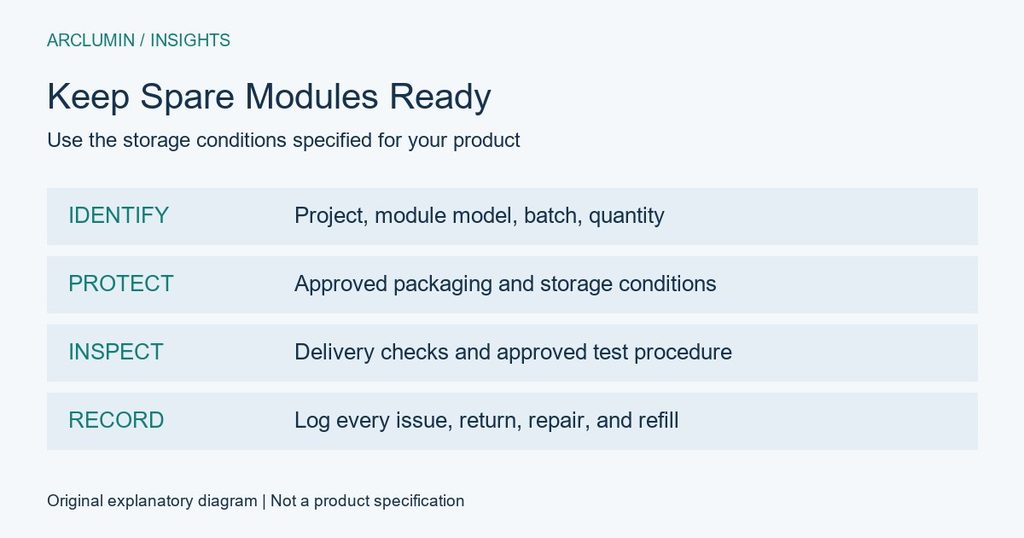
On arrival, check quantities, labels, packaging, and visible condition. Have the technical team perform acceptance checks according to the manufacturer’s instructions. Finding a problem during delivery inspection is better than finding it during an urgent repair.
Use the specified packaging and storage conditions to protect the modules from moisture, static discharge, impact, and pressure on the display surface. Label the storage case with the project, module type, batch reference, and quantity. Keep serviceable stock separate from parts waiting for diagnosis or repair.
Update the stock record whenever a module is used, returned, or repaired. For long-term storage, follow the manufacturer’s inspection and testing instructions. Do not invent a universal monthly power-on schedule or heating procedure for every type of module.
Choose a Quantity That Fits Your Maintenance Plan
Spare LED modules are worth planning at the time of purchase, but a useful stock is about more than a percentage. Count each module type, agree on acceptable downtime, and check how long repairs and replacement deliveries take. Then set the quantity and replenishment process with the supplier.
Share your screen size, installation location, and operating schedule with the Arclumin team to discuss a suitable spare-module and replacement-parts plan.
For project inquiries, please contact your dedicated Arclumin Sales Consultant. Our team operates across time zones to support projects in Europe, North America, Africa, Australia, and markets worldwide.
WhatsApp +86 136 8235 1211 · 7×24 — we reply within 24 hours.

 SG Steady GlowIndoor Fixed LEDP1.25 – P4
 PL Pure LightIndoor Fixed LEDP1.25 – P1.86COB Fine Pitch LED→
 OG Obsidian GlowCOB Fine Pitch LEDP0.7 – P1.86View all product series →Not sure which series fits your project? Get a Recommendation →