Colorlight X4m Video Controller for Small and Medium-Sized LED Screens
Published 2026-08-15 · Updated 2026-09-22 · By Arclumin Team
The Colorlight X4m combines video processing and USB playback for small and medium-sized LED screens. Learn how to check pixel capacity, sources, and system compatibility before choosing it.
Choosing an LED screen involves more than comparing pixel pitch, cabinet dimensions, and brightness. The video controller also needs to match the screen resolution, the available content sources, and the way staff will operate the installation. For a modest fixed display, an integrated controller can simplify the equipment list and make everyday source changes easier.
The Colorlight X4m video controller is an option worth considering for small and medium-sized LED screens. Its suitability depends on the pixel layout and operating requirements, rather than the physical size of the screen alone. This guide explains its main capabilities, where it can fit, and the checks to complete before choosing a control system.
What the Colorlight X4m Does
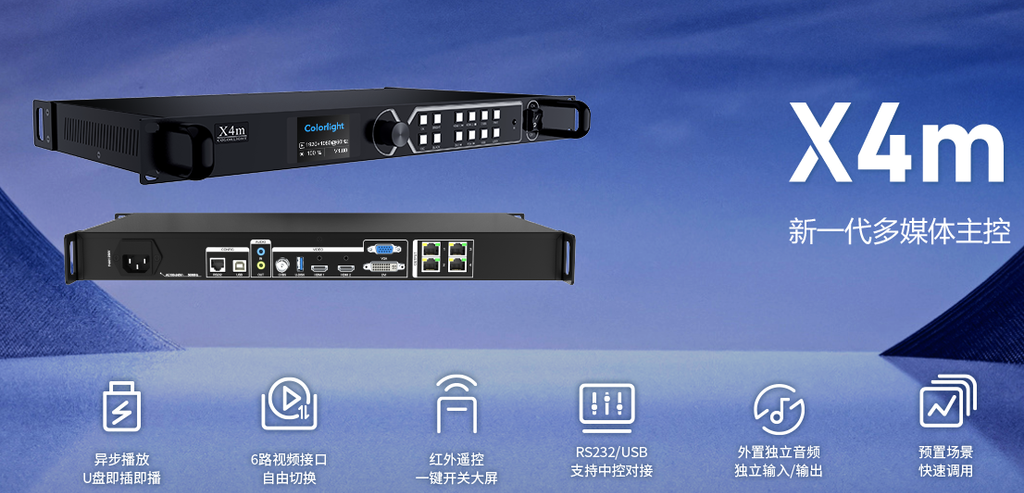
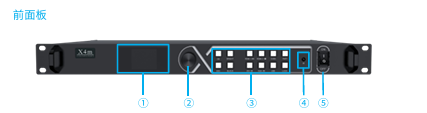
A controller sits between the content source and the LED receiving cards. It prepares the image for the display layout and sends the output to the screen. The X4m combines video processing with sending functions, so it can serve as the central device in a straightforward display installation.
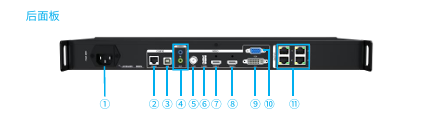
Colorlight specifies a maximum load of 2.6 million pixels, four Gigabit Ethernet outputs, and a maximum width of 3840 pixels or height of 2000 pixels. These limits apply together; the maximum width and height do not describe a supported full rectangular canvas. Inputs include two HDMI 1.4 connections, DVI, VGA, and CVBS, plus USB media playback.
The specification lists video inputs up to 1920 x 1080 at 60 Hz, while USB video playback is limited to 1920 x 1080 at 30 Hz. It also provides scaling, cropping, 16 scene presets, Ethernet port redundancy, and separate 3.5 mm audio input and output. USB and RS232 control are supported, with an optional infrared remote for OSD operation.
Check Pixel Capacity Before Screen Area
Two screens with the same physical dimensions can place very different demands on a controller. A finer pixel pitch increases the number of pixels across the same surface. Start with the actual horizontal and vertical pixel counts from the cabinet layout, then multiply them to calculate the total screen load.
For example, a hypothetical 1920 x 1080 screen contains 2,073,600 pixels. That is below the stated total capacity, but the project still needs an acceptable distribution across the output ports. A 2560 x 1440 layout contains 3,686,400 pixels, which exceeds the total capacity even though neither dimension exceeds its individual limit.
A long storefront display deserves the same careful check. Do not approve a layout simply because its overall area looks small or its width is below the maximum. Ask the system designer to verify total pixels, each port’s load, receiving-card compatibility, and the planned cable routing before equipment is ordered.
Match the Inputs to Everyday Content
Make a list of the sources that will actually be connected. A meeting room might need a presenter’s laptop and a dedicated media player, while a reception screen may mainly show a prepared welcome loop. Confirm the connector, output resolution, adapter requirements, and audio path for each source.
Multiple input connectors are useful when equipment changes between sessions. However, a list of available inputs should not be interpreted as a promise that every source can appear simultaneously in an independent window. If a project requires several live pictures at once, specify that requirement separately and obtain confirmation of the proposed controller’s capability.
For a wide or unusually shaped screen, prepare content for the actual display proportions. Stretching an ordinary presentation to fill a long canvas can distort logos and faces. During commissioning, compare the intended full-screen layout with a cropped or proportionally scaled version and agree on the preferred result.
Use USB Playback for Prepared Content
USB playback can be useful for a reception message, a showroom introduction, or a simple promotional loop. Staff can bring prepared media to the controller instead of keeping a presentation computer connected throughout the day. This is most useful when the content is predictable and updates are handled locally.
Prepare a test drive with the exact files intended for use, then check playback on the supplied unit. A file extension alone does not establish that its video encoding, resolution, audio, and duration will work as expected. Include the longest video, a still image, and any file that is essential to the opening sequence.
Document how staff select the media, change sources, and recover after a power interruption. If the project needs remote scheduling, frequent updates across several locations, or a centrally managed playlist, define those functions explicitly. Local USB playback alone does not establish that a controller provides a complete networked signage workflow.
Choose an Appropriate Arclumin Display System
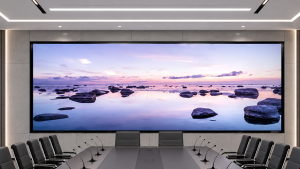
For an indoor meeting room, reception area, or compact showroom, explore the SG Steady Glow indoor fixed LED series. The display configuration and control system should be selected together. The series name describes the screen family; it does not guarantee that every model or receiving-card configuration is compatible with the same controller.
Projects involving presentations and workplace communication can also start with Arclumin’s Corporate & Control Rooms LED solutions. For a simple meeting display, the priority may be clear text and predictable source changes. A control room with several live feeds or demanding continuity requirements needs a more detailed system design.
Evaluate content from the nearest normal viewing position before finalizing the screen. Fine text, spreadsheet cells, and presentation diagrams can expose weaknesses that are difficult to see in a colorful demonstration video. Controller selection should support the agreed viewing task alongside the panel, receiving cards, and content design.
Plan Setup and Handover
Commissioning should begin with the confirmed cabinet map and a labeled connection plan. Review the Colorlight X2m and X4m Quick Start Guide before setting up the controller. Test each source independently, verify that the entire image appears in the correct position, and check the screen edges for missing or repeated content. Save the approved configuration and keep a copy with the project handover records.
Test the actual speaker system separately from the picture. Audio should follow the intended output path, with volume checked during source changes and media playback. The presence of Ethernet outputs for the LED system should not be treated as an assurance that sound will emerge from the screen cabinets.
If presets are part of the operating plan, give staff clear names and a short instruction sheet explaining their use. For a project that requires backup operation, test the proposed failure scenario during commissioning. A listed redundancy function still needs a correctly designed connection arrangement and a practical recovery test.
Decide Whether the X4m Fits Your Project
The X4m can be a practical choice when the pixel map is within its limits, the source requirements are straightforward, and local media playback is useful. It should be assessed as part of the complete LED system. A small physical screen can still require a different controller if its resolution or operating requirements are more demanding.
Before requesting a quotation, prepare the cabinet layout, pixel pitch, total resolution, content sources, audio requirements, and daily operating routine. Include any future expansion or backup requirement so that the initial equipment selection does not restrict the project later. This gives the supplier a clear basis for recommending a suitable configuration.
Find control system specifications, software, and operating guides in the Arclumin Downloads Center. Confirm that the documentation matches the supplied hardware, firmware, and accessories before installation.
For project inquiries, please contact your dedicated Arclumin Sales Consultant. Our team operates across time zones to support projects in Europe, North America, Africa, Australia, and markets worldwide.
WhatsApp +86 136 8235 1211 · 7×24 — we reply within 24 hours.

 SG Steady GlowIndoor Fixed LEDP1.25 – P4
 PL Pure LightIndoor Fixed LEDP1.25 – P1.86COB Fine Pitch LED→
 OG Obsidian GlowCOB Fine Pitch LEDP0.7 – P1.86View all product series →Not sure which series fits your project? Get a Recommendation →